
Set your hosted CV to private or recruiter-only, and strip out your full address, National Insurance number, passport or licence numbers and bank details before you upload anything. Keep a redacted version for screening. Send the full document only one-to-one, after you have confirmed who the recipient really is and why they need it.
TL;DR:
- Setting your hosted CV to recruiter access keeps it searchable by verified employers without exposing it publicly, while full privacy prevents unsolicited discovery.
- Replace your full address with a town or region, and omit your birth date, identification numbers, bank details, signatures, and restricted project information.
- Send a redacted CV first, then verify the employer through its corporate email, published phone number, vacancy listing, and profile before sharing identity documents.
- Privacy settings cannot recall downloaded or forwarded copies, so enable link expiry and download limits, revoke unused links, and review each version shared through applications.
- Screening without identifying details can reduce bias, but it only delays disclosure; employers still verify identity, right to work, and qualifications after a conditional offer.
Table of Contents
- Which CV privacy settings should you choose?
- What should you remove from a CV before uploading it?
- How can you share a full CV safely?
- Which platform controls should you check, and how?
- Does anonymising your CV help during screening?
- A transport recruiter’s view on CV privacy
- How we help you host your CV securely
- FAQ
- Sources
Which CV privacy settings should you choose?
Most job boards offer several visibility levels:
- Public: anyone, including search engines, can open your CV.
- Limited public: a profile page shows a summary, while the full document stays hidden.
- Recruiter-only: verified employers and recruiters can search for you, but the public cannot.
- Fully private: only you see the CV, and you attach it to applications yourself.
For a hosted CV, recruiter-only or private is the safe default. The National Protective Security Authority advises jobseekers not to make CVs publicly available, to use account settings to control who can view a profile, and to share full CVs one-to-one with trusted contacts. The trade-off is discoverability: a private CV will not appear in employer searches, so you may miss unsolicited approaches. Recruiter-only keeps most of that visibility while shutting out the open web.
Settings have practical limits. A toggle cannot recall a copy that someone has already downloaded, forwarded or indexed, so treat every upload as potentially permanent. Where a platform offers link expiry or download restrictions, switch them on.
Pro Tip: Choose your visibility before you upload, not after. A CV that was public may already have been copied.
What should you remove from a CV before uploading it?
Upload only what a recruiter needs for initial screening. The Information Commissioner’s Office says recruiters should collect only the information necessary for the purpose, and that details such as a full home address, date of birth, National Insurance number, passport or licence numbers, bank details and signatures are not needed to select candidates. Apply the same standard to your own document:
- Full home address: replace it with your town or region.
- Date of birth: leave it out entirely.
- National Insurance number: never include it on a CV.
- Passport and driving licence numbers: keep them for a verified right-to-work or licence check later.
- Bank details: these have no place on any CV.
- Signatures: remove scanned signatures, which can be copied.
- Sensitive project details: describe your role and outcome without naming restricted sites, clients or security arrangements.
- Security-clearance specifics: state that you hold clearance if relevant, but not the level’s supporting paperwork or reference numbers.
Good public substitutes are a region, a professional email address, and the skills and licences that matter for the role, such as a CPC or an NRSWA card. These show your suitability without exposing anything that could be used to impersonate you.
How can you share a full CV safely?
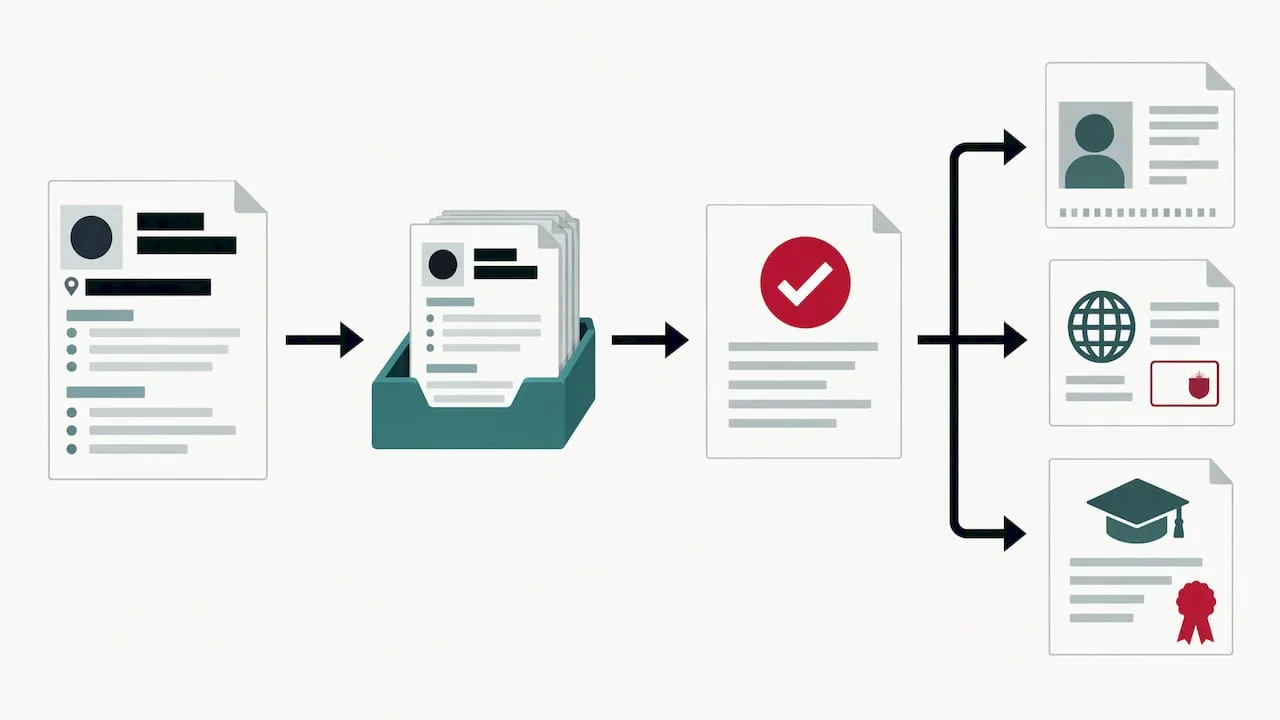
Staged disclosure means you send a redacted CV first, then release the full CV and identity documents only when an employer asks for them as part of a verified process. The ICO notes that candidates should expect to be told when intrusive vetting is planned, so a request that arrives with no explanation deserves a pause.
Before you send anything sensitive, verify the recipient:
- Check that the email comes from a corporate domain, not a free webmail address.
- Find the vacancy on the employer’s own site or on a confirmed job-board listing.
- Compare the recruiter’s name and details against the employer profile.
- Phone the organisation on a published number, not one supplied in the message.
- Ask why each document is needed and when it will be deleted.
If the contact seems suspicious, stop. Report it through the platform and follow the NPSA advice to cease engagement, since malicious actors can use online job platforms to obtain non-public information.
Pro Tip: Keep a short log of who received which version of your CV and when. It makes later clean-up far quicker.
Which platform controls should you check, and how?
Spend some time in your account settings and look for these:
- Profile visibility: public, recruiter-only or private.
- Searchability to employers: whether your CV appears in employer searches at all.
- Public CV page: whether a shareable web address exists and whether search engines can index it.
- Download permissions: whether employers can save a copy.
- Link-sharing settings: active links to a CV, and when they expire.
- Notifications and account security: alerts, password strength and additional verification.
To change visibility, open your profile or CV settings and switch to recruiter-only or private. Find shared links in the same area, then revoke or delete any you no longer need. Review past applications separately, because a main CV, a tailored CV, a public page, a private link and an invitation can each expose different content.
Toggling a setting will not remove copies already downloaded, so build a habit of periodic cleanup. Delete obsolete versions and old links every few months, and again whenever you change roles. Our own online CV page for jobseekers explains how hosted CVs and their controls work on our platform.
Does anonymising your CV help during screening?
Anonymisation means removing identifiable fields, such as your name, photo and address, during initial screening. It is most often used to reduce bias in shortlisting. Gov treats it as a screening design choice rather than a universal privacy fix: the process should be explained to candidates, assessors should be trained, and it may prevent some targeted recruitment activity.
For you as a candidate, it can offer benefits. A redacted first-stage CV exposes less data, and an employer that anonymises is already treating your information carefully. It does not remove later checks. Right-to-work, identity and qualification verification still happen once an offer is conditional, and the ICO expects employers to explain why they need that information. Anonymisation delays disclosure; it does not replace it.
A transport recruiter’s view on CV privacy
Most privacy advice treats the CV as something to hide. I think that is the wrong instinct. A CV that no one can see gets you no interviews, and transport employers search for specific tickets, licences and project experience. The real skill is controlling the order of disclosure: show your competence early, show your identity later. We build hosted CVs with visibility controls for exactly that reason, and I would encourage you to review your settings every time you apply or change role, not just when you first sign up. Treat each upload as a decision, not a formality.
— Rob
How we help you host your CV securely
We offer hosted CVs with visibility controls, and transport employers on our platform can be checked through employer profiles before you share anything. Because we serve only the transport sector, our platform offers targeted access to transport employers. Set up your CV with the controls described above, then compare any approach against the employer’s profile page. If you are hiring, our advertising rates page shows how to publish a listing and an employer profile.
Start by opening your online CV and choosing your visibility today.
FAQ
What is the safest visibility setting for a CV?
Recruiter-only or private is the safest default for a hosted CV. It keeps your document out of public search while letting verified employers find you, if you choose recruiter-only. NPSA guidance advises against making CVs publicly available.
Should I put my address on my CV?
No, a town or region is enough for screening. A full address is not needed to select candidates, and the ICO’s recruitment guidance says recruiters should collect only what is necessary. Provide it later, once an employer has a verified reason to ask.
Can I recall a CV after someone has downloaded it?
No. Changing a privacy setting affects who can view your CV from that point, but it cannot recall copies already downloaded or forwarded. Delete old versions and revoke active links regularly to limit further exposure.
How do I know a recruiter is genuine?
Check that their email uses a corporate domain, that the vacancy appears on the employer’s own site or a confirmed listing, and that their details match the employer profile. Phone the organisation on a published number before sharing identity documents.
Does anonymising my CV hide me from employers permanently?
No. Anonymisation applies to early screening only. GOV.UK guidance frames it as a screening design choice, and identity and right-to-work checks still follow at later stages.
Sources
- Applicant Beware - Who Is Recruiting You? | Personal Safety & Security for High-Risk Individuals | NPSA
- Employment practices and data protection: recruitment and selection | ICO
- Gov


